
Introduction: Why Prompt Writing Matters More Than You Think
If you’ve ever used ChatGPT and felt the response was almost right—but not quite—you’re not alone. Beginners often assume that ChatGPT “just knows” what they want. In reality, ChatGPT is only as good as the prompt you give it.
A prompt is simply the instruction, question, or message you type into ChatGPT. But the way you write that instruction determines:
- How accurate the response is
- How detailed or simple the answer becomes
- Whether the output sounds professional, casual, or creative
- How useful the final result is for your goal
Learning how to write a proper prompt for ChatGPT is the single most important skill for getting value from AI—especially if you’re a beginner.
This guide is written in plain English, with real examples, step-by-step explanations, and practical templates. You don’t need technical knowledge or coding skills. By the end of this article, you’ll know how to talk to ChatGPT in a way that produces clear, useful, and high-quality responses every time.
What Is a ChatGPT Prompt? (Beginner Explanation)
A ChatGPT prompt is any text you enter to guide the AI’s response. This includes:
- A question
- A command
- A description of a task
- A role assignment
- A full set of instructions
Simple Prompt Example
❌ Bad prompt:
“Write about marketing.”
✅ Better prompt:
“Write a beginner-friendly explanation of digital marketing in 800 words with examples.”
The second prompt works better because it gives context, clarity, and constraints.
How ChatGPT Understands Prompts (In Simple Terms)
ChatGPT does not think like a human. It predicts the most useful response based on:
- Your words
- The order of your instructions
- The level of detail you provide
- Patterns it has learned from training
If your prompt is vague, ChatGPT fills in the gaps—often incorrectly.
Think of ChatGPT Like a Very Literal Assistant
If you tell a human assistant:
“Prepare the report.”
They might ask follow-up questions.
ChatGPT won’t. It will guess.
That’s why beginners must learn to over-explain just enough.
The 5 Core Elements of a Proper ChatGPT Prompt
Every effective prompt—no matter how simple—contains most of these elements.
1. Clear Goal
Always start by knowing what you want.
Ask yourself:
- Do I want information?
- Do I want content written?
- Do I want ideas?
- Do I want analysis?
❌ Unclear:
“Explain SEO.”
✅ Clear:
“Explain SEO to a complete beginner in simple language.”
2. Context (Very Important for Beginners)
Context tells ChatGPT who the answer is for and why it’s needed.
Examples of context:
- Skill level (beginner, intermediate, expert)
- Industry
- Platform (blog, YouTube, email, website)
- Purpose (learning, selling, researching)
✅ Example:
“I am a beginner blogger with no technical background. Explain on-page SEO in simple terms.”
3. Specific Instructions
The more specific you are, the better the output.
You can specify:
- Word count
- Tone (professional, friendly, casual)
- Format (list, table, steps)
- Style (storytelling, academic, conversational)
✅ Example:
“Write a friendly, conversational explanation in 600 words using short paragraphs and bullet points.”
4. Constraints and Boundaries
Constraints prevent ChatGPT from going off-track.
Examples:
- “Do not use technical jargon”
- “Avoid marketing language”
- “No emojis”
- “Family-friendly content only”
✅ Example:
“Avoid complex terms and keep the explanation suitable for a 12-year-old.”
5. Output Format
Tell ChatGPT exactly how you want the result to look.
Formats include:
- Step-by-step guide
- Table
- FAQ
- Checklist
- Script
✅ Example:
“Provide the answer as a step-by-step guide with headings.”
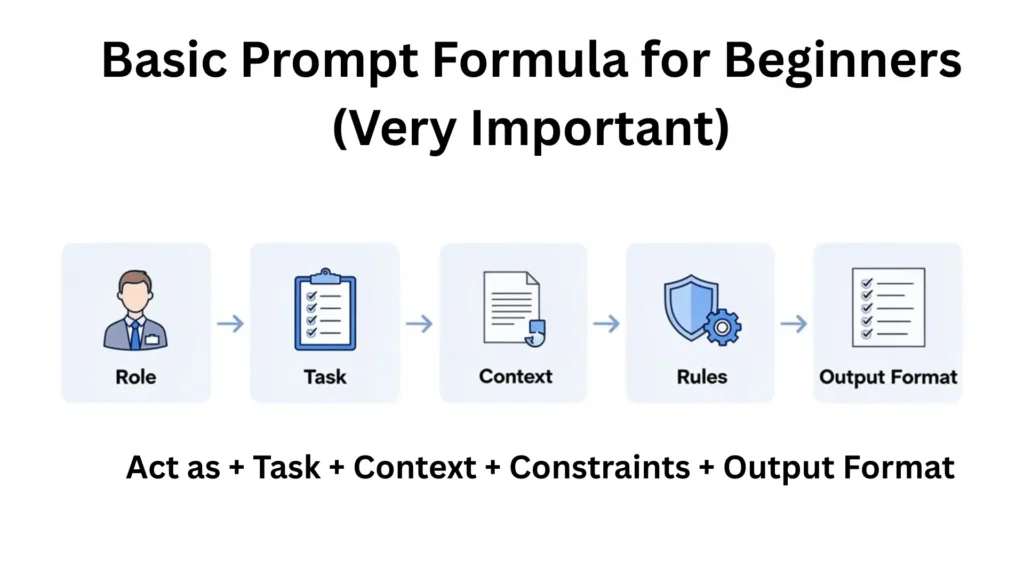
Basic Prompt Formula for Beginners (Very Important)
Here’s a simple formula you can reuse:
Act as + Task + Context + Constraints + Output Format
Example Using the Formula
“Act as an experienced content writer. Write a beginner-friendly guide explaining what ChatGPT is, for non-technical users, in a friendly tone, using short paragraphs and bullet points.”
This structure alone will improve your results dramatically.
Common Beginner Mistakes When Writing ChatGPT Prompts
Mistake 1: Being Too Vague
“Write content.”
ChatGPT doesn’t know what kind of content.
Mistake 2: Asking Multiple Tasks at Once
“Explain SEO, write a blog, and create keywords.”
Break tasks into separate prompts.
Mistake 3: Assuming ChatGPT Knows Your Intent
ChatGPT doesn’t remember your goals unless you state them.
Always include intent.
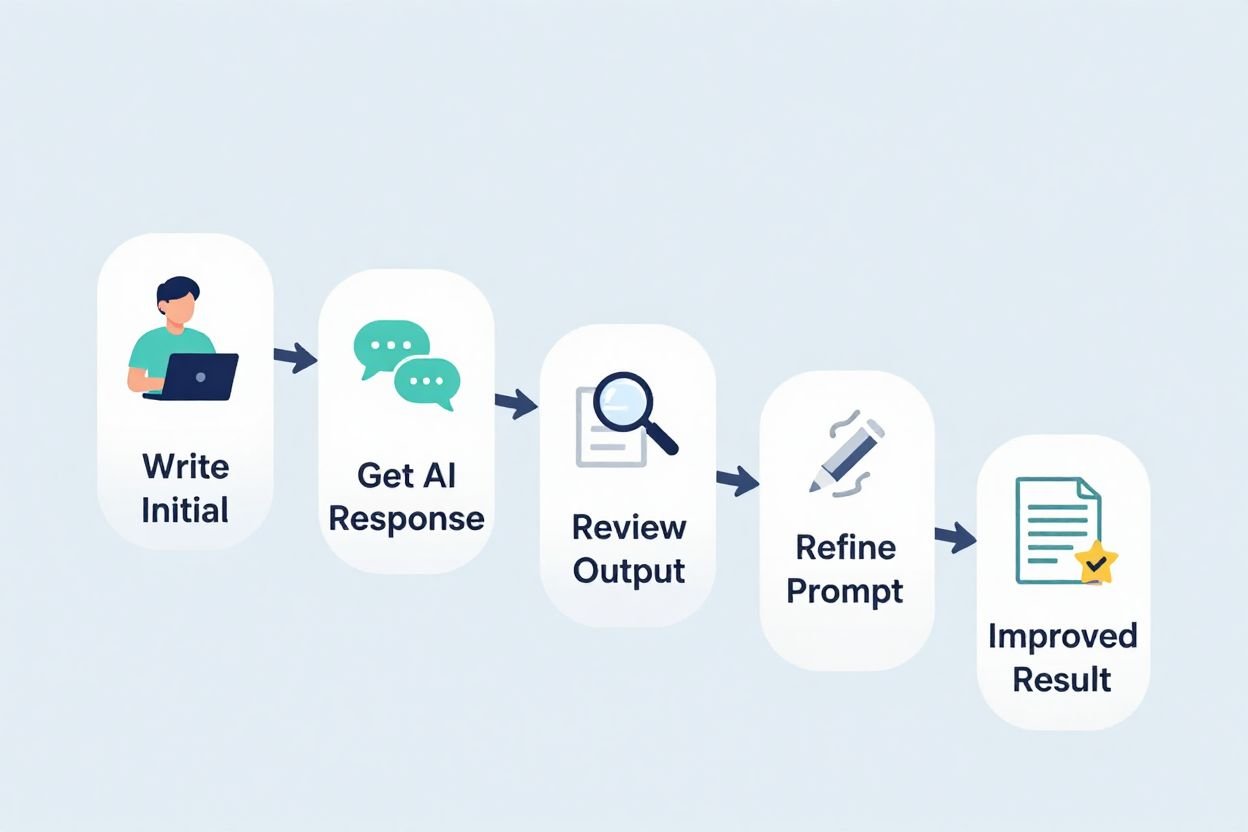
Mistake 4: Not Iterating
Your first prompt doesn’t need to be perfect.
Follow-up prompts like:
- “Make it simpler”
- “Add examples”
- “Rewrite for beginners”
Beginner Prompt Examples (Real-World Use Cases)
Example 1: Learning a Topic
“Explain blockchain technology to a complete beginner using simple language and real-world examples.”
Example 2: Writing Content
“Write a 1,000-word blog post about healthy eating for beginners. Use a friendly tone, short paragraphs, and practical tips.”
Example 3: Social Media
“Create 10 Instagram captions about productivity for freelancers. Keep them short and motivational.”
Example 4: Email Writing
“Write a professional but friendly email requesting a meeting with a potential client.”
Example 5: Studying
“Summarize this topic in bullet points suitable for exam revision.”
How to Improve a Prompt Using Follow-Up Instructions
You don’t need to start over. You can refine results.
Examples:
- “Make it more detailed”
- “Add examples”
- “Rewrite in simpler language”
- “Change tone to professional”
This is called prompt iteration, and it’s how experts work with AI.
Advanced Prompting Tips (Still Beginner-Friendly)
Use Role Assignment
“Act as a digital marketing expert…”
This changes the quality instantly.
Use Step-by-Step Requests
“Explain step-by-step…”
This forces logical structure.
Ask for Self-Review
“Check the answer for clarity and accuracy.”
ChatGPT can refine its own output.
Chain Prompts
Prompt 1: Outline
Prompt 2: Expand section 1
Prompt 3: Improve tone
This produces higher-quality results than one massive prompt.
How Long Should a Prompt Be?
There is no perfect length.
- Simple task → short prompt
- Complex task → detailed prompt
Rule of thumb:
If the task matters, write more detail.
Beginner Prompt Templates (Copy & Paste)
Learning Template
“Explain [topic] to a complete beginner using simple language, examples, and short paragraphs.”
Writing Template
“Write a [word count] article about [topic] for [audience] using a [tone] style.”
Business Template
“Act as a [role]. Create a [type of content] for [goal] with a professional tone.”
Creative Template
“Write a creative story about [idea] with a [mood] tone and engaging descriptions.”
Benefits of Writing Proper Prompts
- Better answers
- Less editing
- Saves time
- More accurate information
- Consistent output quality
Drawbacks (If Prompts Are Poor)
- Generic responses
- Wrong assumptions
- Overly long or too short answers
- Irrelevant information
Future of Prompt Writing (Beginner Insight)
Prompt writing is quickly becoming a core digital skill.
In the future:
- Jobs will require prompt literacy
- Prompt templates will replace many tools
- AI users who ask better questions will outperform others
Learning this skill early gives you a major advantage.
Conclusion: Mastering ChatGPT Starts With Better Prompts
If you remember only one thing from this guide, let it be this:
ChatGPT does exactly what you ask—nothing more, nothing less.
Writing a proper prompt isn’t about being technical. It’s about being clear, specific, and intentional.
As a beginner, your goal is not perfection. It’s improvement. Start with simple prompts, refine them, and observe how ChatGPT responds. Over time, you’ll naturally learn how to communicate with AI more effectively.
The better your prompts, the smarter ChatGPT becomes—for you.
Frequently Asked Questions (FAQ)
1. What is the best prompt length for beginners?
There is no fixed length. Use as many words as needed to explain your goal clearly.
2. Can ChatGPT understand casual language?
Yes. You can write prompts in natural, conversational English.
3. Should beginners use “Act as” prompts?
Yes. Role-based prompts greatly improve output quality.
4. Why does ChatGPT sometimes give wrong answers?
Usually due to unclear or vague prompts that force it to guess.
5. Can I correct ChatGPT after it answers?
Absolutely. Follow-up prompts are encouraged.
6. Is prompt writing a technical skill?
No. It’s a communication skill—anyone can learn it.
7. How long does it take to get good at prompting?
Most beginners see improvement within a few days of practice.
8. Are prompts reusable?
Yes. Good prompts can be saved as templates and reused.
✅ READY-MADE CHATGPT PROMPT TEMPLATES (BEGINNER FRIENDLY)
🔹 1. BLOGGING PROMPT TEMPLATES
📌 Blog Post Writing (Basic)
Prompt:
Act as an experienced blog writer. Write a detailed blog post about [TOPIC] for [TARGET AUDIENCE]. Use a friendly and professional tone. Include an introduction, clear headings, short paragraphs, and practical examples. Keep the content beginner-friendly and easy to understand.
📌 SEO-Optimized Blog Article
Prompt:
Act as an SEO expert and content writer. Write a [WORD COUNT] word SEO-optimized blog post about [FOCUS KEYWORD]. Use proper headings (H2, H3), natural keyword placement, short paragraphs, and bullet points. The tone should be human, helpful, and informative. Avoid keyword stuffing.
📌 Blog Outline Generator
Prompt:
Create a detailed blog outline for an article about [TOPIC]. Include an engaging introduction, main sections with subheadings, and a strong conclusion. The outline should be suitable for a beginner audience.
📌 Rewrite or Improve Blog Content
Prompt:
Rewrite the following blog content to make it clearer, more engaging, and beginner-friendly. Improve flow, readability, and tone without changing the original meaning:
[PASTE CONTENT HERE]
🔹 2. STUDYING & LEARNING PROMPT TEMPLATES
📌 Learn a Topic (Beginner Level)
Prompt:
Explain [TOPIC] to a complete beginner using simple language. Break it down step by step, use real-life examples, and avoid technical jargon.
📌 Exam Preparation Summary
Prompt:
Summarize [TOPIC / CHAPTER NAME] in clear bullet points for exam preparation. Highlight key concepts, definitions, and important points. Keep it concise and easy to revise.
📌 Study Notes Creator
Prompt:
Create well-structured study notes on [TOPIC]. Use headings, bullet points, and short explanations. Make the notes suitable for quick revision.
📌 Practice Questions Generator
Prompt:
Create [NUMBER] practice questions with answers based on [TOPIC]. The difficulty level should be [EASY / MEDIUM / HARD].
📌 Explain Like I’m 10
Prompt:
Explain [TOPIC] as if you are teaching a 10-year-old. Use very simple words and easy examples.
🔹 3. BUSINESS PROMPT TEMPLATES
📌 Business Idea Generation
Prompt:
Act as a business consultant. Suggest [NUMBER] business ideas related to [INDUSTRY / SKILL]. Explain each idea briefly with potential benefits and target customers.
📌 Professional Email Writing
Prompt:
Write a professional and polite email for [PURPOSE]. The tone should be respectful, clear, and concise. Keep it suitable for a business setting.
📌 Business Plan Outline
Prompt:
Create a simple business plan outline for [BUSINESS IDEA]. Include sections such as overview, target market, products/services, marketing strategy, and revenue model.
📌 Sales Copy Writing
Prompt:
Act as a copywriter. Write persuasive sales copy for [PRODUCT / SERVICE] targeting [TARGET AUDIENCE]. Highlight benefits, solve customer pain points, and keep the tone trustworthy and professional.
📌 Meeting Agenda Creator
Prompt:
Create a clear and professional meeting agenda for a meeting about [TOPIC]. Include objectives, discussion points, and time allocation.
🔹 4. SOCIAL MEDIA PROMPT TEMPLATES
📌 Social Media Post Ideas
Prompt:
Generate [NUMBER] social media post ideas about [TOPIC] for [PLATFORM – Instagram, LinkedIn, Facebook, Youtube, Twitter, etc.]. Keep them engaging and relevant to the audience.
📌 Caption Writing
Prompt:
Write [NUMBER] engaging captions for [PLATFORM] about [TOPIC]. The tone should be [FUN / PROFESSIONAL / MOTIVATIONAL]. Keep captions short and clear.
📌 Hashtag Generator
Prompt:
Generate relevant and trending hashtags for [TOPIC] suitable for [PLATFORM]. Avoid spammy hashtags.
📌 Content Calendar
Prompt:
Create a [7 / 14 / 30]-day social media content calendar for [NICHE]. Include post ideas, content type, and posting goals.
📌 Video Script (Reels / Shorts)
Prompt:
Write a short and engaging video script for [Instagram Reel / YouTube Short / TikTok] about [TOPIC]. Hook viewers in the first 3 seconds and keep it concise.
🔹 BONUS: UNIVERSAL PROMPT IMPROVER (VERY USEFUL)
Use this when results are not good 👇
Prompt:
Improve the following prompt to make it clearer, more detailed, and more effective for ChatGPT. Keep it beginner-friendly:
[PASTE YOUR PROMPT HERE]
✅ FINAL TIP FOR BEGINNERS
If ChatGPT’s answer isn’t perfect, don’t restart.
Just say things like:
- “Make it simpler”
- “Add examples”
- “Rewrite for beginners”
- “Improve clarity and tone”
This is how professionals use ChatGPT.
🌟 Looking Ahead: What Smartphone Future Might Feel Like (2025–2030)











2 thoughts on “How to Write a Proper Prompt for ChatGPT? (Beginner’s Complete Guide)”