
Artificial Intelligence tools are becoming smarter every day, but the quality of output still depends heavily on how well you write the prompt. This is especially true for Gemini AI, Google’s powerful AI model that can generate text, images, ideas, summaries, and creative content.
Many users say “Gemini AI doesn’t give good results” — but in most cases, the real issue is poor prompt writing.
In this guide, you’ll learn how to write the best prompt for Gemini AI, step by step, from beginner level to advanced techniques. By the end, you’ll know exactly how to get accurate, creative, and high-quality results from Gemini AI every time.

What Is a Prompt in Gemini AI? (Simple Explanation)
A prompt is the instruction you give to Gemini AI.
It tells the AI:
- What you want
- How you want it
- In what style
- For which purpose
Example
❌ Bad prompt:
Write about AI
✅ Good prompt:
Write a beginner-friendly article explaining how Gemini AI works for students, using simple language and examples.
The second prompt gives clarity, and clarity is the key to good AI output.
How Gemini AI Understands Prompts (Behind the Scenes – Simple Explanation)
Most people think Gemini AI reads prompts like humans read sentences — but that’s not how it works. Gemini AI processes your prompt in layers of meaning, not just words. Understanding this helps you write far better prompts.
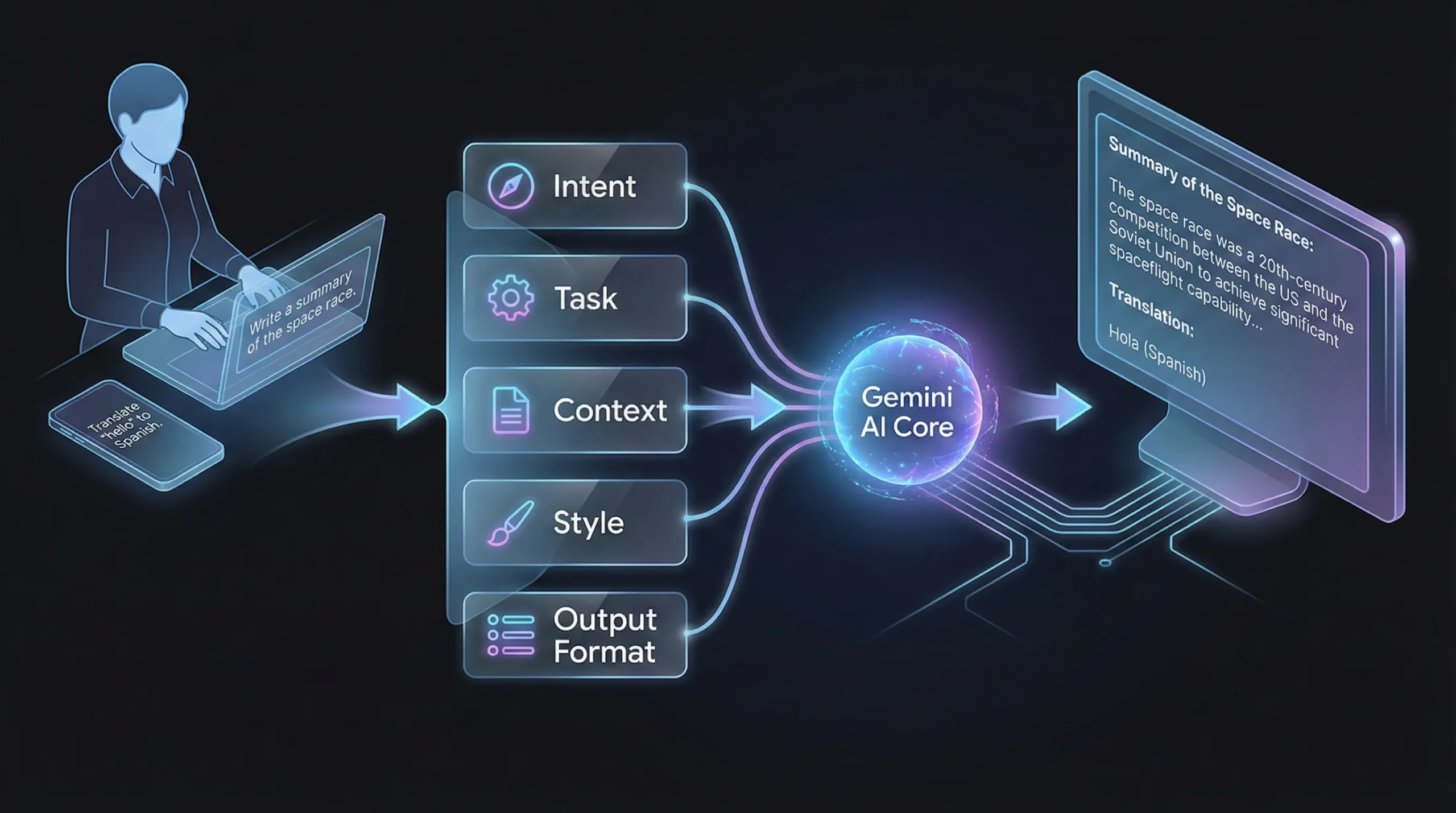
When you type a prompt, Gemini AI first tries to identify your intent. It asks internally:
“What does the user actually want to achieve?”
Then it looks for context — the background information, constraints, and hints you provided. Finally, it applies pattern matching based on millions of examples it was trained on.
Here’s how Gemini AI typically breaks down a prompt:
- Intent recognition: What is the main goal?
- Task identification: Is this writing, editing, summarizing, or creating?
- Context analysis: Who is this for? Why is it needed?
- Style inference: Formal, casual, creative, professional?
- Output expectation: Paragraphs, bullets, steps, or code?
When your prompt is unclear, Gemini AI fills the gaps by guessing — and that’s when results feel inaccurate or generic.
That’s why clear, structured prompts reduce hallucinations, repetition, and off-topic answers. The better you guide the AI, the less it has to assume.
Why Writing a Good Prompt Matters in Gemini AI
Gemini AI is extremely powerful, but it does not read your mind. It only understands what you clearly describe.
Benefits of a Well-Written Prompt
- More accurate answers
- Less repetition
- Better structure
- Human-like tone
- Less need for re-editing
- Faster results
Think of Gemini AI like a very intelligent assistant — the better your instructions, the better the response.
Basic Structure of the Best Gemini AI Prompt
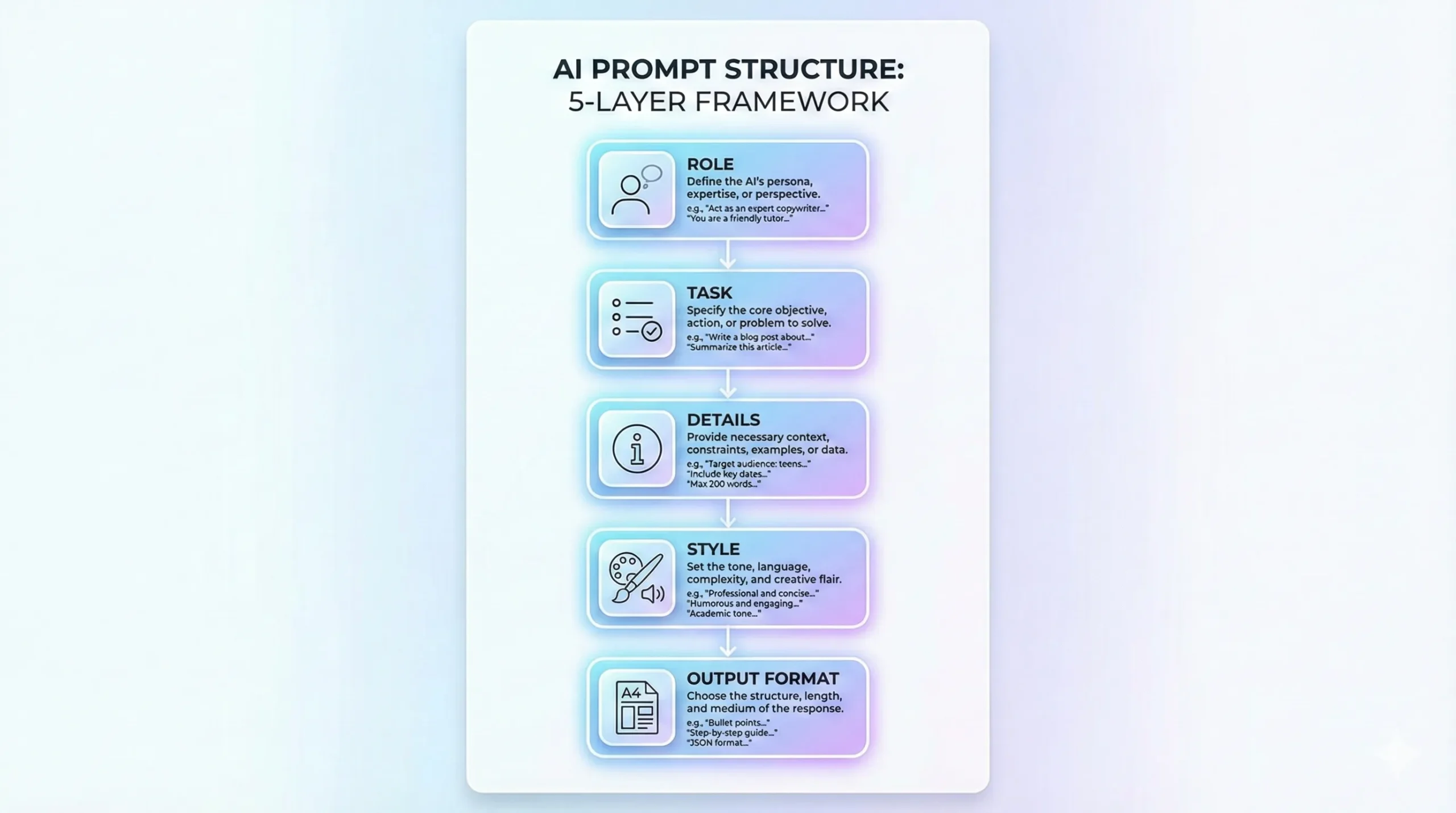
To write the best prompt, follow this simple 5-part structure:
1. Role
Tell Gemini AI who it should act as.
2. Task
Clearly explain what you want.
3. Details
Add important information, context, or constraints.
4. Style & Tone
Tell it how the output should sound.
5. Format
Specify the output format.
Why Most Gemini AI Prompts Fail (And How to Fix Them)
Many users blame Gemini AI for poor results, but in reality, most prompts fail because of human mistakes. Let’s look at the most common problems — and how to fix them.
Common Reasons Prompts Fail
1. Too many tasks in one prompt
Asking Gemini AI to write, summarize, format, and optimize everything at once often leads to shallow output.
2. No audience defined
Without knowing who the content is for, Gemini AI defaults to generic language.
3. No format instructions
If you don’t specify structure, you’ll get messy paragraphs.
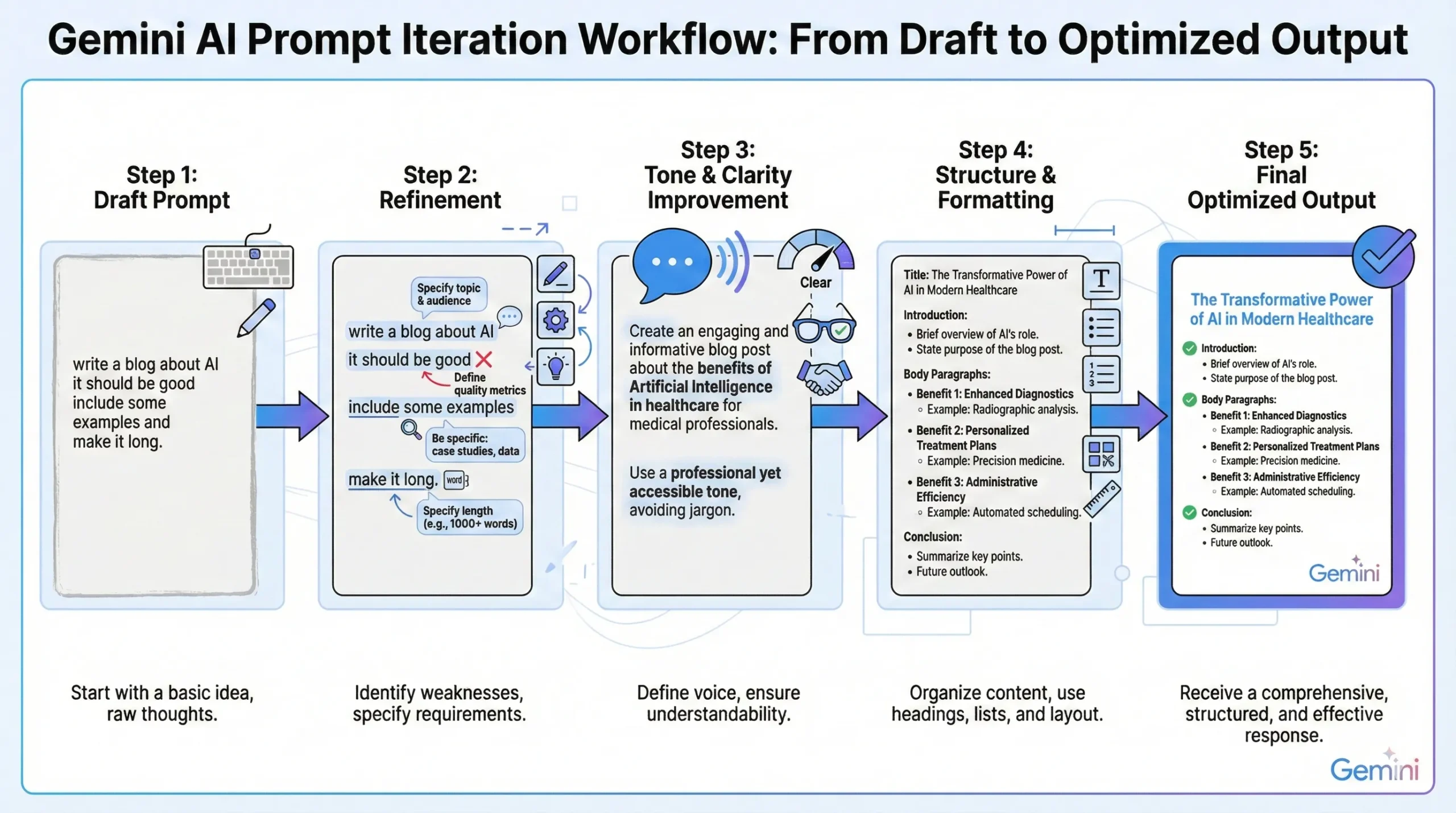
4. Expecting perfection in one try
AI works best through iteration, not one-shot commands.
How to Fix These Problems
- Break large tasks into smaller prompts
- Define your audience clearly
- Always specify format and tone
- Improve output step by step
Instead of this ❌
Write a perfect article on AI.
Use this ✅
Create an outline for a beginner-friendly article on Gemini AI.
Now expand section 1 with examples.
Rewrite the article to sound more human.
This simple shift dramatically improves results.
Step-by-Step: How to Write the Best Prompt for Gemini AI
Step 1: Define the Role Clearly
Always start by assigning a role.
Example:
Act as an experienced SEO content writer with 10+ years of experience.
Why this works:
- Gemini AI adapts vocabulary
- Improves tone
- Matches expertise level
Step 2: Be Very Specific About the Task
Vague prompts give vague results.
❌
Write an article on smartphones.
✅
Write a 2000-word SEO-optimized article on the future of smartphones in the next 5 years for a tech blog.
Step 3: Add Context and Constraints
This is where most users fail.
Include:
- Target audience
- Word count
- Platform (blog, Instagram, YouTube)
- Country (if relevant)
Example:
Target audience is beginners, use simple language, avoid technical jargon.
Step 4: Control the Tone and Style
You can control how Gemini AI writes.
Common styles:
- Human & conversational
- Professional & formal
- Friendly & casual
- Educational & step-by-step
Example:
Write in a natural human tone, not robotic, not overly formal.
Step 5: Specify the Output Format
This saves editing time.
Examples:
- Use H1, H2, H3 headings
- Use bullet points
- Add FAQs
- Include examples
Prompt Writing Examples: Bad vs Good vs Best (Gemini AI)
Seeing real comparisons makes prompt writing much easier to understand. Below are three real-world examples.
Example 1: Blog Writing Prompt
❌ Bad Prompt
Write an article on Gemini AI.
⚠️ Good Prompt
Write a 1500-word article explaining Gemini AI.
✅ Best Prompt
Act as an experienced tech writer. Write a 2000+ word beginner-friendly article on how Gemini AI works. Use simple language, headings, examples, and a human conversational tone.
Example 2: Image Editing Prompt
❌ Bad Prompt
Edit my photo.
⚠️ Good Prompt
Edit my photo with cinematic effects.
✅ Best Prompt
Create a cinematic portrait with dramatic lighting, soft shadows, realistic skin texture, sharp eyes, and a blurred background. Keep the subject natural and professional.
Example 3: Social Media Caption Prompt
❌ Bad Prompt
Write Instagram captions.
⚠️ Good Prompt
Write captions for an Instagram post.
✅ Best Prompt
Write 5 short, trendy Instagram captions for an AI-edited photo. Keep the tone modern, confident, and under 15 words.
These examples show one clear rule:
👉 Specific prompts always win.
Best Prompt Examples for Gemini AI (Real & Working)
Example 1: Blog Writing Prompt
Act as a professional SEO content writer. Write a 2000+ word blog post on how to write effective prompts for Gemini AI. Use a human tone, proper headings, examples, and beginner-friendly language.
Example 2: Image Editing Prompt
Edit the photo into a cinematic portrait with dramatic lighting, natural skin texture, soft background blur, sharp eyes, and professional color grading.
Example 3: Instagram Caption Prompt
Write 5 engaging Instagram captions for an AI photo editing post. Keep the tone trendy, short, and friendly.
Common Mistakes to Avoid When Writing Gemini AI Prompts
- Being too short
- Giving multiple unrelated tasks
- Not defining the audience
- Forgetting tone instructions
- Expecting perfect results from one line
Remember: AI improves with guidance.
Advanced Gemini AI Prompt Techniques (Pro Level)
1. Use Examples in Prompts
Gemini AI learns from examples instantly.
Write captions similar to: “Simple look, powerful vibe ✨”
2. Ask Gemini AI to Improve Its Own Output
Rewrite the above answer to sound more human and engaging.
3. Break Big Tasks Into Smaller Prompts
Instead of one long instruction, do:
- Create outline
- Expand each section
- Add SEO optimization
Prompt Templates You Can Reuse (Copy-Paste Ready)
Universal Prompt Template
Act as [role]. Create [content type] on [topic] for [audience].
Use a [tone] tone, include [specific requirements], and format the output using [format].
Gemini AI Image Prompt Template
Create a high-quality image with [style], [lighting], [mood], [background], and realistic details. Keep the subject clear and professional.
How to Write Powerful Image Prompts for Gemini AI (Advanced Tips)
Image prompts need a slightly different approach than text prompts. The key is visual clarity.
1. Describe the Subject Clearly
Instead of saying “a person,” specify:
- Boy / girl / man / woman
- Age range
- Expression
2. Control Lighting
Lighting words make a huge difference:
- Cinematic lighting
- Soft natural light
- Dramatic shadows
- Neon glow
3. Define Mood & Emotion
Mood controls the feel of the image:
- Confident
- Calm
- Mysterious
- Happy
4. Background & Environment
Tell Gemini AI where the subject is:
- Studio background
- Outdoor nature
- City street
- Cyberpunk environment
Mini Example
Create a cinematic portrait of a young man with confident expression, dramatic side lighting, soft shadows, blurred dark background, realistic skin texture, and professional color grading.
The more visual detail you provide, the better the result.
How Long Should a Gemini AI Prompt Be?
There is no perfect length, but:
- Simple task → short prompt
- Complex task → detailed prompt
Quality matters more than length.
FAQs: Writing Prompts for Gemini AI
1. Can beginners write good Gemini AI prompts?
Yes. Clarity matters more than technical words.
2. Are longer prompts always better?
Not always — but detailed prompts work better for complex tasks.
3. Can Gemini AI generate images from prompts?
Yes, Gemini AI supports image-related instructions and enhancements.
4. Is prompt engineering a skill?
Yes, and it’s becoming one of the most valuable AI skills.
Conclusion
Learning how to write the best prompt for Gemini AI is a game-changer. You don’t need advanced tools or paid software — just clear thinking and structured instructions.
Once you master prompt writing:
- Gemini AI becomes more accurate
- Your work becomes faster
- Your results look professional
Whether you’re creating blog posts, editing photos, generating captions, or brainstorming ideas — the prompt is everything.
Start practicing today, refine your prompts, and Gemini AI will reward you with better outputs every time.